

Have you ever felt like you’re being followed online? Ads for a pair of shoes you just glanced at suddenly appear on every website you visit, and some sites even greet you with your city’s name. It’s common knowledge that our digital activities leave a footprint. What if you could wear a digital disguise to browse more privately? The best guide to finding residential proxies.
Every time you connect to the internet, your device uses a unique public label called an IP address. Think of it as a digital return address on a postcard; it tells websites where to send information back to you, but it also reveals your general location. This is the simple mechanism that allows companies and websites to tailor content—and ads—directly to you.
This is where the idea of a digital middleman comes in. Instead of sending your requests directly to a website, you could send them through an intermediary computer that requests on your behalf. This tool, known as a proxy, essentially lets you borrow its IP address. For anyone watching, your traffic appears to come from the proxy’s location, not your own, giving you a simple way to hide your IP address.
Understanding what proxies are is the first step toward taking back control of your digital identity. It’s a powerful concept, but the way it works is surprisingly straightforward. Using a proxy for online security doesn’t require a technical degree—it just requires understanding how this clever disguise can give you more privacy and freedom online.
The Internet’s Return Address: What Your IP Address Reveals
Every time you connect to the internet, your device is assigned a unique code. This is your IP address, and it’s best to think of it like the return address you’d write on a letter. When your computer asks a website for information—like loading a video or an article—it needs to tell that website where to send the information back. Without this “digital return address,” the data you requested would have nowhere to go.
This IP address, however, does more than just ensure you get your data. It also gives away two key pieces of information about you: your approximate physical location (usually your city or region) and which company provides your internet service. It doesn’t reveal your name or exact street address, but it’s enough for websites to customize content, show local ads, or, in some cases, block you based on your country.
You might be wondering, “So what is an IP address if not my personal ID?” It’s the ID of your connection, not you as a person. Think of it this way: anyone sending mail from your house would use the same return address. Likewise, every device connected to your home Wi-Fi—your phone, laptop, and smart TV—usually shares the same public IP address.
While essential for the internet to function, this system means you’re not browsing anonymously. Websites and advertisers can see where you’re connecting from, which is why you see ads for local businesses or get messages like “This video is not available in your country.” This raises a natural question: what if you want to browse more privately or get around those digital borders? If you want to hide your IP address, you need a middleman. That’s where a proxy comes in.
How a Proxy Server Works: Your Personal Shopper for the Internet
How does this “middleman” actually work? The easiest way to understand what proxies are is to imagine you’ve hired a personal shopper for the internet. Instead of going to a store (a website) yourself, you give your shopping list (your web request) to your shopper, who then goes out and gets what you need on your behalf.
Let’s stick with this personal shopper idea. You tell them you want to visit ExampleNews.com. The shopper leaves your house, travels to the website’s main computer, and says, “I’d like to see the homepage.” The website gives the page to the shopper, who then brings it right back to you. From the website’s perspective, they only ever dealt with the personal shopper. They never saw you, they don’t know your address, and they have no idea the information was ultimately for someone else.
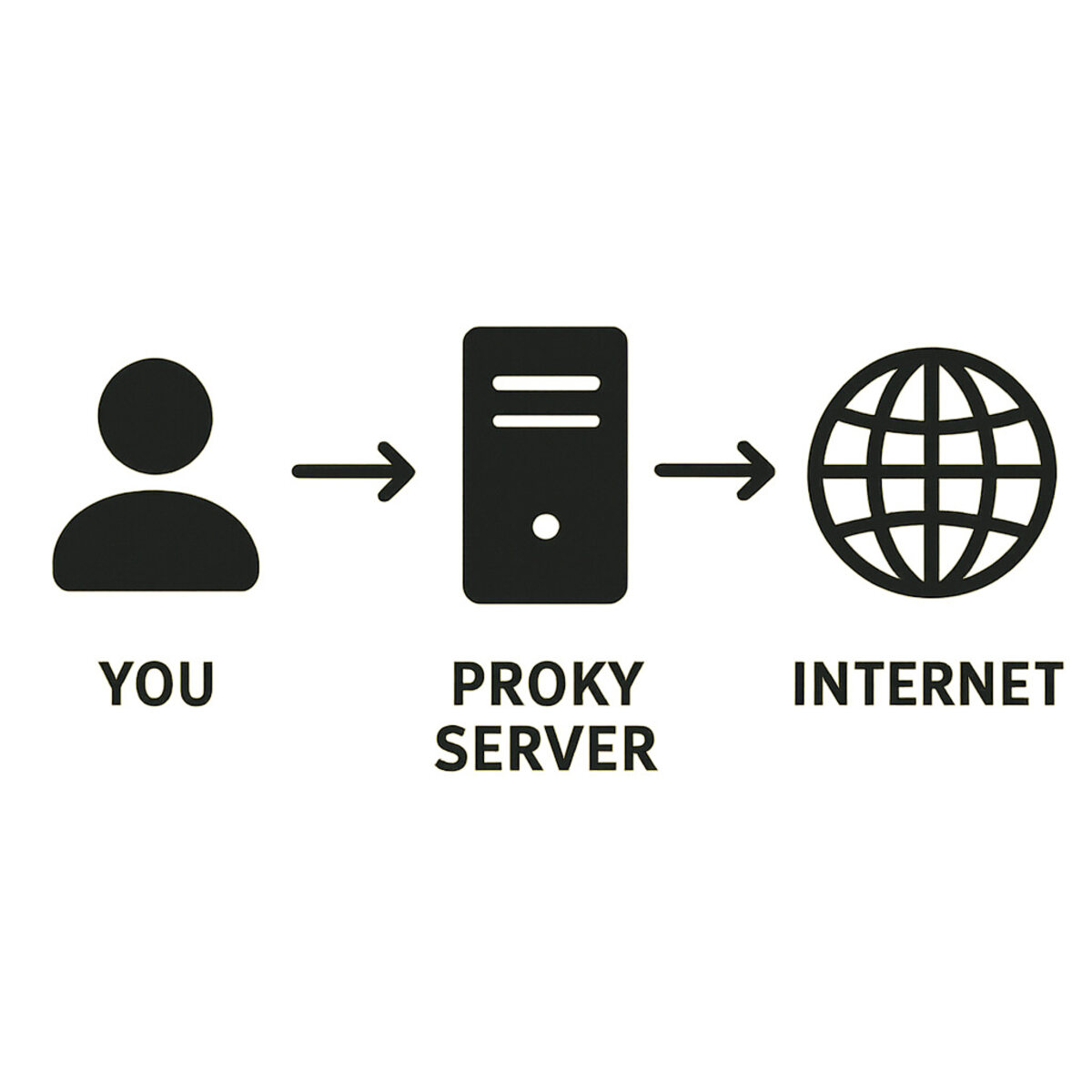
Proxy servers operate on this exact principle. When you use a proxy, your computer doesn’t send requests directly to websites anymore. Instead, it sends all its requests to one place first: the proxy server. That server then forwards your request to the destination website, but it does so using its own IP address. You effectively borrow the proxy’s identity to browse the web.
As a result, the path your internet traffic takes is completely different. Instead of a direct line from you to the internet, it now looks like this:
You —> The Proxy Server —> The Website
When the website sends information back, it follows the same path in reverse, going to the proxy server first, which then forwards it to you. The website you’re visiting only ever communicates with the proxy. It has no direct connection to your device and, crucially, no way of seeing your real IP address.
This simple redirection accomplishes two powerful things at once. First, it hides your personal IP address, making your browsing activity much more private. Second, because you are using the proxy’s IP address, you appear to be browsing from wherever the proxy server is physically located—whether that’s in another city or on the other side of the world. This is the key to unlocking a proxy’s first superpower: the ability to become anonymous online.
The First Superpower: Becoming Anonymous Online
This simple act of hiding your IP address is more powerful than it sounds. Think of your real IP address as a digital fingerprint you leave on every website you visit. Over time, data brokers and advertising networks can connect these fingerprints, building a surprisingly detailed profile of your habits: what you shop for, what news you read, and what videos you watch. By using a proxy, you stop leaving your personal fingerprint behind. Instead, you leave the proxy’s, which is shared by many other users, making your individual activity much harder to track.
For example, have you ever searched for a new pair of boots, only to see ads for those exact boots follow you everywhere for the next week? That’s your digital fingerprint at work. When you use a proxy, the boot website only sees the proxy’s IP address. Later, when you visit a different site, your request might go through a different proxy or simply come from your real IP if the proxy is off. The trail is broken. To the ad networks, it looks like two different people, and they can’t connect your interest in boots to your other online activities.
But this kind of privacy goes beyond just avoiding targeted ads. An anonymous proxy provides a crucial layer of security when you need to browse sensitive information. Whether you’re researching a personal health condition, looking into financial help, or simply exploring a topic you’d rather keep private, a proxy ensures your activity isn’t tied directly back to your home network. The website knows someone visited, but it doesn’t know it was you.
A proxy’s first major benefit is acting as your digital disguise, making you an anonymous figure on the web. But hiding your identity is only half the story. Remember, when you use a proxy, you don’t just hide your location—you borrow the proxy’s. This leads directly to its second superpower: the ability to be anywhere in the world you want.
The Second Superpower: Unlocking a Borderless Internet
That ability to borrow the proxy’s location is what unlocks a proxy’s second, and perhaps most popular, superpower: the ability to digitally travel the world. Your real IP address doesn’t just identify your device; it also gives away your general physical location, like a digital zip code. Websites use this information to create virtual borders, deciding what you can and can’t see based on the country you’re in. This practice is often called geo-restriction.
Have you ever tried to watch a video online, only to be met with the frustrating message, “This content is not available in your region”? That’s geo-restriction in action. The streaming service checks your IP address, sees you aren’t in an approved country, and blocks you. The same thing can happen with international news sites, online stores that offer country-specific sales, or even booking a flight, where prices can sometimes change based on your location.
This is where you can unblock websites with a proxy. Imagine you’re in the United States and want to watch a show that’s exclusively available on a UK streaming platform. If you go directly to the site, your US-based IP address acts like a passport that gets denied at the digital border. But if you connect to a proxy server located in London, your request now appears to come from the UK. The streaming service sees a British IP address, grants it access, and the proxy forwards the show back to you. From the website’s perspective, you’re a local.
This location-shifting ability is one of the biggest proxy server benefits, effectively dissolving the internet’s artificial borders. It’s not just about entertainment; it’s about accessing information and services freely, regardless of where you happen to be. However, just as you wouldn’t use any random stranger’s address for your mail, not all proxies are created equal. Some are crowded and slow, while others are private and fast. This brings up an important distinction between the types of proxies you might encounter.
Public vs. Private Proxies: The Public Bus vs. The Private Car
When you start looking into the different types of proxy servers, the options can feel a bit overwhelming. In reality, it boils down to a simple choice, much like deciding how to get across town: do you take the public bus or drive your own private car? They both get you there, but the experience, speed, and safety are completely different.
Think of a public proxy as the free city bus. Anyone can hop on, which is fantastic for the price (free!), but it also means the bus gets very crowded. With so many people getting on and off, your journey will be slow and unpredictable. More importantly, you don’t really know who’s driving the bus or what their intentions are. These proxies are often run by anonymous operators, making them a gamble for anything beyond casual, low-stakes browsing.
A private proxy, in contrast, is like your own personal car. You pay for it (typically a small monthly fee), but the experience is in a different league. It’s reserved just for you. This means your connection is fast, direct, and reliable every single time. Because you’re paying a reputable company for the service, you can be confident that your journey is secure. For anyone serious about privacy or needing a stable connection, this is almost always the better choice. Finding the best proxy service for privacy usually means looking for a trusted private provider.
The trade-off comes down to cost versus performance and trust.
| Factor | Public/Free Proxy (The Bus) | Private/Paid Proxy (The Car) | | :— | :— | :— | | Cost | Free | Small monthly fee | | Speed | Slow and crowded | Fast and dedicated | | Trust | Very low (unknown operator) | High (reputable provider) |
While the allure of a free tool is tempting, the risks of using a free proxy can be significant. When you use one, you are handing over all your internet traffic—the websites you visit, the forms you fill out—to a stranger. Some “free” services have hidden, malicious purposes, and it’s crucial to understand these dangers before you ever consider using one.
The Hidden Dangers of “Free” Proxy Services
That question of trust is exactly where the promise of a “free” proxy falls apart. While it’s tempting to use a tool that costs nothing, you have to ask yourself: how is the operator paying to run the computer that’s handling all your traffic? The answer is often unsettling. When a service is free, it’s a strong sign that you are the product. They aren’t offering a free ride out of kindness; they are profiting from you in a way that isn’t immediately obvious, and that’s where the risks of using a free proxy begin.
The most common and straightforward risk is data logging. Think of it as the proxy operator keeping a detailed diary of your every move online. They can see every website you visit, every search term you type, and—most dangerously—the information you enter into forms. This includes usernames, passwords, and even credit card details. This information can then be sold to advertisers, identity thieves, or other criminals. Instead of providing privacy, the free proxy becomes a tool for surveillance, completely defeating its purpose.
Even more alarmingly, some malicious free proxies don’t just watch your traffic—they actively change it. This is known as malware injection. Imagine the proxy is supposed to simply pass a webpage to you from the internet. A bad proxy can intercept that page and secretly add its own code before you see it. This code could flood your screen with pop-up ads, redirect you to scam websites, or even install harmful software like viruses or spyware directly onto your computer without your knowledge. You might think you’re visiting a trusted site, but you’re actually interacting with a version that has been booby-trapped.
Ultimately, it all highlights a fundamental rule of the internet: trust is everything. A free service run by an unknown person or group offers no accountability. The promise of an anonymous proxy is often a dangerous illusion; you may be hidden from the website, but you are completely exposed to the proxy owner. For this reason, anyone serious about privacy steers clear of them. If free proxies are a digital minefield, a truly safe and private option looks very different.
Residential Proxies: The Ultimate Digital Disguise
After learning about the risks of free proxies, it’s clear that trust is the most important factor. But even among paid, reputable services, there are different types of proxy servers designed for different jobs. The two most common kinds are datacenter and residential proxies, and the difference between them is like showing up to an exclusive local event as a recognized resident versus an obvious tourist. One blends in perfectly, while the other sticks out.
Most standard proxies you’ll encounter are datacenter proxies. As the name suggests, their IP addresses come from massive, commercial data centers—buildings packed with powerful computers. While often fast and affordable, these IPs are relatively easy for websites to spot. Imagine a website seeing hundreds of different requests all coming from the same commercial address; it’s a clear signal that the traffic isn’t from a typical home user. Because of this, websites on high alert for automated traffic are more likely to get suspicious and block them.
This is exactly where a residential proxy changes the game. A residential proxy is a premium type of proxy that uses a genuine IP address assigned to a real home by an Internet Service Provider (ISP), just like the one you have for your own Wi-Fi. When you use one, your request looks like it’s coming from a regular person’s house somewhere in the world. To the website you’re visiting, you look like a genuine local, not someone using a commercial service. This makes residential proxies the ultimate digital disguise because they are nearly impossible to detect and far less likely to be blocked.
Because of this high level of trust, people use residential proxies to unblock websites with a proxy when other methods fail, especially for accessing strict streaming libraries or ensuring online shopping prices are accurate for a specific region. They are a powerful tool for tasks that demand authenticity. But all this talk of hiding your IP and changing your location might sound a lot like another tool you’ve probably heard of: a VPN. So, what’s the real difference?
Proxy vs. VPN: What’s the Real Difference?
On the surface, a proxy and a VPN can seem like two names for the same thing. Both can hide your IP address and make you appear to be in another location. It’s a common point of confusion, but the proxy vs vpn difference is significant, and it comes down to two key ideas: scope and security.
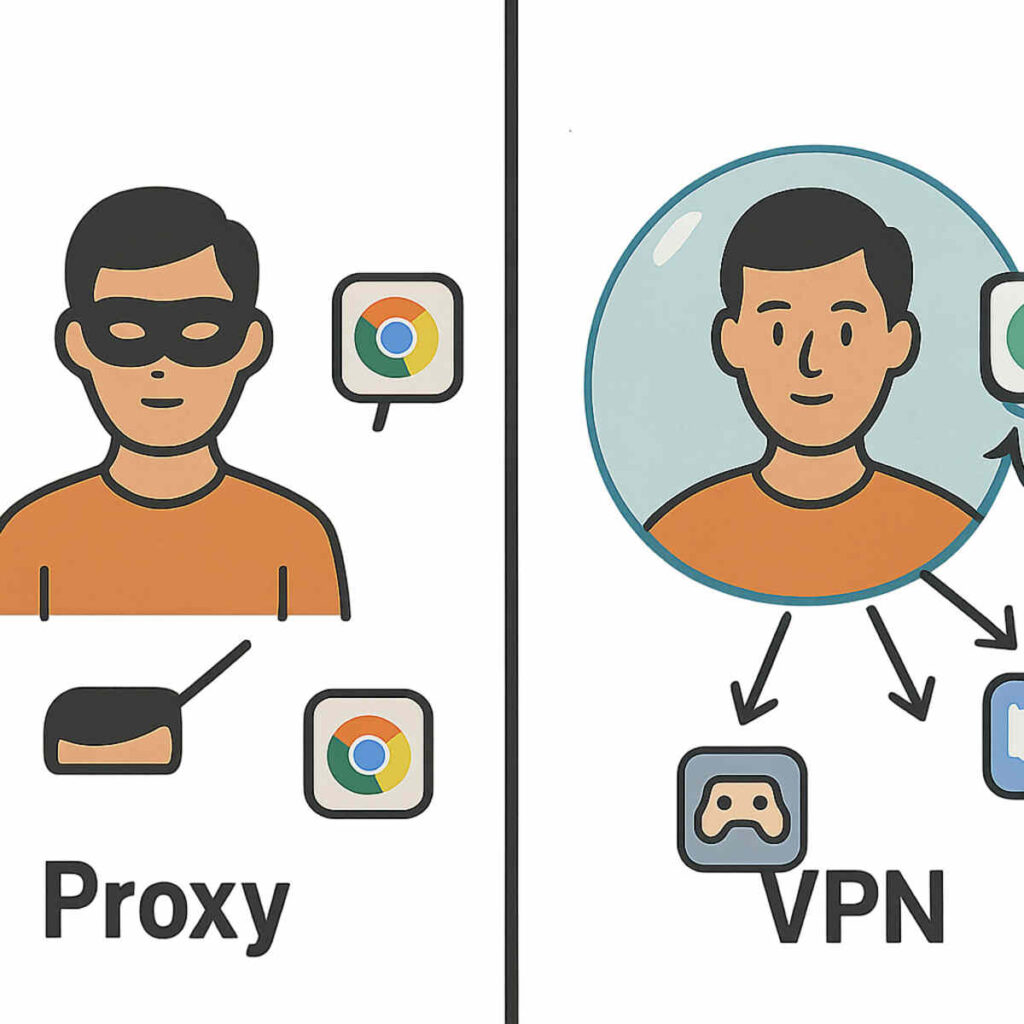
The first major distinction is how much of your internet activity they cover. A proxy typically works on a case-by-case basis, like for a single application. You might set up your web browser to use a proxy, but your email app and online games will still use your regular home connection. It’s a tool for a specific task. In contrast, a VPN (Virtual Private Network) works at the device level. When you turn on a VPN, it reroutes all the internet traffic from your computer or phone—the browser, the apps, the background updates—through its server.
Beyond that wider scope, a VPN adds a crucial layer of protection that most proxies don’t: encryption. Encryption is like a secret code that scrambles your data as it travels from your device to the VPN server, creating a secure, private tunnel for your information. This makes a VPN essential for online security, especially if you’re using public Wi-Fi at a café or airport, as it prevents anyone on the same network from snooping on your activity. Most proxies simply pass your request along without this protective layer.
Perhaps the best way to visualize the difference is with an analogy. A proxy is like wearing a simple disguise—say, a mask and a hat—to go into one specific store. The store won’t know who you are, but you’re still out in the open for everyone else to see. A VPN, on the other hand, is like getting inside a private, armored car that takes you to all of your destinations. Not only do the stores not know who you are, but no one on the street can see you or what you’re doing along the way.
So, which one do you need? If your goal is simple and specific, like accessing a region-locked YouTube video or checking a foreign sales price in your browser, a proxy is a lightweight tool for the job. But if your goal is overall privacy and robust security for everything you do online, a VPN is the far more comprehensive and safer choice. While both are powerful tools for online privacy, they are built to solve fundamentally different problems.
The Two Flavors of Proxies: HTTP vs. SOCKS5 Explained Simply
Just like you’d use a different tool to hammer a nail than to turn a screw, different proxies are built for different online tasks. The two most common types you’ll encounter are HTTP and SOCKS5.
An HTTP proxy is the specialist. Think of it as a middleman that is fluent in one language: the language of the web. It’s designed specifically to handle traffic from your web browser—the requests you make when you visit websites. Because it understands this web traffic, it can sometimes be faster and more efficient for simple browsing. If your only goal is to view a website from another region or hide your IP address while surfing the web, an HTTP proxy is a perfectly good tool for the job.
On the other hand, a SOCKS5 proxy is the versatile all-rounder. Unlike its HTTP cousin, a SOCKS5 proxy doesn’t try to understand the data it’s handling. It simply takes any type of internet traffic—from a web browser, a gaming application, a streaming app, or a file-sharing program—and passes it along. To use an analogy, if an HTTP proxy is a translator who only speaks “website,” a SOCKS5 proxy is a mail carrier who delivers any package to any address, no questions asked.
When it comes to the SOCKS5 vs HTTP proxy choice, it all boils down to what you need to do. Do you just need a proxy for your web browser? An HTTP proxy will work great. But if you need to route traffic from an application or a game, SOCKS5 is the more flexible and powerful option. With this knowledge, you’re ready to consider how you might actually use one.
How to Set Up a Proxy: A Quick Look at Your Options
Understanding the difference between proxy types is one thing, but how do you actually use one? The idea of changing your network configuration can sound intimidating. The good news is that in most cases, it’s no more complicated than changing a setting in an app you already use. Knowing how to set up a proxy is less about technical skill and more about knowing where to look.
For the most part, these proxy settings live in places you’re already familiar with. You don’t need special software to start, just the details of the proxy server you want to use (like its address and port number). The configuration boxes are typically found in one of three places:
- In your web browser’s network settings (like Chrome, Firefox, or Edge).
- In your operating system’s network settings (Windows or macOS).
- Via a dedicated app from a trusted proxy service.
While you can go into your browser or OS menus and manually type in the server details, there’s a much simpler path. Most reputable proxy providers offer a dedicated application or a clear guide that handles the configuration for you. Think of it like this: manually entering the settings is like assembling a piece of furniture with a confusing diagram, whereas using the provider’s app is like having it delivered fully assembled. You just turn it on.
The easiest and safest route is to use the tools provided by a trustworthy service. Now that you’ve seen how proxies act as a middleman for you, it’s worth exploring how they can also work in reverse to protect websites.
The Other Side of the Coin: What is a Reverse Proxy?
We’ve seen how proxies can act as a personal middleman for you, the internet user. But what if the website itself used a middleman? This is where the concept gets flipped on its head, and it’s a key part of how the modern, stable internet works. This “other side of the coin” is called a reverse proxy.
The best way to understand a reverse proxy is to think of it as a receptionist for a massive, busy office building (the website’s main server). When you visit a popular website, you aren’t actually knocking directly on the door of its most important computer. Instead, you’re greeted by the reverse proxy. This receptionist takes your request, figures out the best and safest way to handle it, and only then passes it along to the right department. You never speak to the CEO directly; you speak to the highly efficient front desk.
This setup offers huge benefits, not for you, but for the website you’re visiting. For one, it provides a major security boost. The reverse proxy can act like a security guard, filtering out suspicious traffic and potential attacks before they ever reach the main server. It also dramatically improves performance. If thousands of people are trying to access the site at once (like during a big online sale), the reverse proxy can distribute the traffic across several servers, preventing a crash. This process is one example of how a proxy server works to ensure a smooth experience for everyone.
Ultimately, the difference is simple: a standard (or “forward”) proxy works for the user, while a reverse proxy works for the server. As a visitor, you won’t even know you’re interacting with one. All you’ll notice is that the website is fast, reliable, and secure. These special proxy servers are the invisible heroes that keep large-scale websites running efficiently behind the scenes.
Your Newfound Knowledge: Using the Internet with Confidence
The internet may have once felt like a place of invisible walls and unseen tracking. Now, you see the path your data takes is not set in stone. You’ve pulled back the curtain on a fundamental piece of online technology, trading confusion for clarity and understanding what proxies are at their core: simple digital middlemen.
This knowledge reveals two key benefits a proxy server offers. You now understand how they provide a form of digital disguise, shielding your real location for greater privacy. You also see how they act as a digital passport, granting you access to parts of the global web that might otherwise be closed off. These aren’t abstract concepts anymore; they are clear solutions to common online frustrations.
The next time you see a “content not available” message or notice an ad that feels a little too personal, you won’t just be a passive user. You will be an informed navigator who understands the forces at play. You’ve demystified a core piece of the internet, forever changing how you see the digital world.